Looking for fountain pens? Head on over to my stationery page because I generally prefer not to use them in art!
Despite what I said above, I do love using fountain pen inks with art! I'll leave my fountain pen ink reviews in the other page.
Deleter Black 4 is allegedly water and copic proof. I highly disagree. Be careful not to wipe at this while wet because it will smear! I hate using this ink. It's a pain to clean and it's not anything proof. I don't recommend it.
I frequenly use Sakura Gelly Roll in white in all 3 sizes. Another favorite is Stardust clear for a touch of glitter. The glitter does come off a bit when you touch it.
I own a white POSCA marker but it explodes every time I use it. I don't use it.
I don't have a ton of experience with alcohol markers. Art Alternatives is garbage. Spectrum Noir doesn't have a nice nib and doesn't blend well. Inklily blends nicely and has a copic like nib. ALL of these brands do not match their inks to their caps. I own quite a few Copic markers and they really have it all going for them other than the huge American mark up. I'm not buying any not on sale. I keep index cards of swatches because they too often do not match up with their cap colors. Super brush nibs are great!
I'm using the Holbein Irodori gouache summer set. I like the color choices and would happily buy the other season sets.
I was very lucky to have found a small set of Daniel Smith watercolor tubes for almost no money. I have Lunar Black, French Ultramarine, Perylene Red, Hansa Yellow Medium. As much as I would have liked a CMYK instead, this is a nice little set!
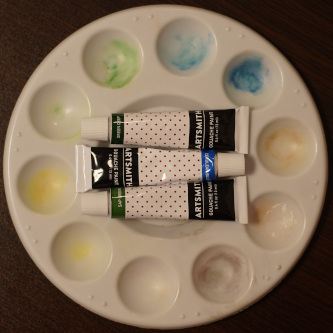
Do not ever buy the Artsmith gouache set. They stained my doll and my palette. Trash.
I haven't tried many sketchbooks, but I do like the Strathmore 300 and 400 series in sizes 9x12 inch and above. Above is a little hard to bring with you, but 9x12 is pretty comfortable.
Good! No complaints!
Paper is very thin, but the killer is "removable pages" which get caught in your sleeves and pulled up as you draw. Bad buy.
The spineless binding looks awesome but the cover rips off as you use it.
Paper is very thin, but worse things can happen.
For notebooks, Leuchtturm 1917 paper can hold up against both fountain pens and light watercoloring. Moleskine does not hold up to either. I have no idea how Moleskine has a following. Their paper is not nice. I have not tried Tomoe River paper, but Leuchtturm is meeting my needs for a fraction of the price.
I love lead holders due to me never wanting to sharpen pencils. I like the Koh-I-Noor Technigraph 5611 because it's metal and sturdy. I use Staedtler refills.
I was gifted a pack of Tombow Mono HB Pencils and they're very nice. The only problem is you have to sharpen them! Once in a while, I'll hit a scratchy spot in the lead. They aren't completely smooth.
I'm a big fan of Sakura arch foam, Pentel Click Eraser ZE23. Foam erases very well. I tried switching to another, then came back to foam and realized how badly the other sucked. Click Eraser does not erase nicely, but is great for tight spaces.
Erasers I've tried:
Claims "no smudge or smear". These are lies.
It's not bad, but the foam eraser is just better.
As an exception to my "fountain pens are better for writing than drawing" opinion, I love using Sailor Compass Fude De Mannen 40 degree for drawing! The fude nib is great for line variation.
I enjoyed using this fountain pen so much that I looked into dip pen options. I own manga nibs, but these nibs are best for line work which I tend to avoid. I chose to buy a Sailor Compass Hocoro with a fude nib for this purpose. This pen feels incredibly cheap and plasticy, but does the job well. When buying a Hocoro, definitely buy the feed attachment if the nib you want doesn't come with one. Fountain pen nibs are not built to hold ink and you'll dip constantly without it. None of these pens have caps. The Sailor Hocoro is included in this, but the nib unit is removable so that the nib can be inserted into the pen body.
Kakimori and Pilot iro-utsushi are other fountain pen nib on nib holder options that I did not opt for. Kakimori nibs fit in regular nib holders while iro-utsushi is non removable. Neither have an option for a feed, but I saw someone attach the spring from a pen under the nib that appeared to act as one. Glass pens are another option for those who do not break everything they touch (not me).
My Rotring rapidograph 0.35 dries out quickly, but takes fountain pen ink. I don't think this thing is even remotely airtight. It produces the finest lines ever when it does work!
My art program of choice is Krita due to limited Linux options. It's much easier to use than GIMP. I still use GIMP as well because there are places where Krita is lacking.
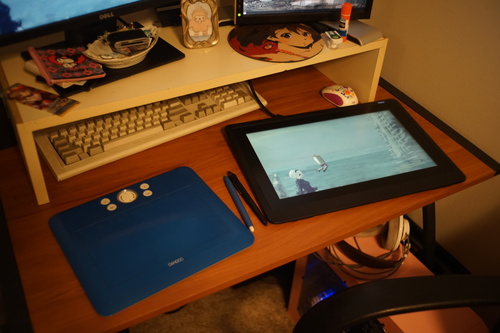
I have a Wacom Cintiq 16 propped up on a table top easel similar to this. The cable is 72 inches long and this is NOT in the specs. I would have appreciated if it was a bit longer. I use the xsetwacom drivers with default settings. If you're confused about Bezier curve values and want to adjust them, check out this site.
I sometimes have an issue where the cursor freezes. This is annoying but easily fixed by turning the pen around to the eraser and then back. The first line drawn when switching from another program to Krita will be messed up. Click on the program outside the drawing range before drawing. I don't know where the issue lies between Krita, drivers, or the tablet.
I highly recommend a remote for your tablet. I'm using a right joycon with some slight drift, which makes it annoying to use with my switch. I connect to it using blueman and use chiizukeiki to map the buttons. There is a folder of notes on this which you are welcome to read and try to adapt the program to your own needs.
This set up is not nearly as simple and easy as on Windows. It can be a struggle. It's a labor of love for Linux. Or distaste for Windows past 7?
I do use an art glove with my tablet. At first I was just larping, but the side of my palm started sticking on the surface when I lost it and I now appreciate it a lot. You can make one of these very easily by tracing your hand on jersey knit fabric and doing just a little sewing.
Are you still a beginner at learning how to draw? I highly recommend not practicing on a digital tablet. Your perfect line that you undid 50 times over 30 minutes to achieve is much less important than the entirety of the image which you may have ignored. Please try out some paper and pencils and use ctrl-z sparingly!